* Estimated delivery times start from the date of shipment, excluding processing time.
* Actual delivery times may vary due to holidays, weather conditions, or customs delays.
Върнатите артикули ще бъдат приети в рамките на 40 дни от датата на получаване на стоките. Персонализираните артикули не могат да бъдат върнати или заменени. Артикулите, закупени с електронна карта за подарък, подлежат само на замяна; възстановявания не са приложими.
Безплатен подарък
Добре дошли в Roymall, вашия професионален уебсайт за закупуване на висококачествени подаръци от универсален магазин. Ние високо ценим и оценяваме вашата подкрепа и искаме да изразим нашата благодарност, като добавим допълнителен елемент на вълнение към вашите покупки. Когато пазарувате при нас, вие не само получавате висококачествени продукти, които подобряват вашия начин на живот, но ще получите и ексклузивен безплатен подарък с всяка поръчка, която направите.Готови ли сте да разгледате нашата колекция и да намерите перфектните подаръци за вас? Разгледайте нашата селекция от висококачествени артикули от универсален магазин, направете поръчката си и очаквайте вълнението от вашия безплатен подарък, който ще пристигне заедно с покупката ви.
Политика за доставка
Ние ще работим усилено, за да доставим артикулите до вас след получаване на вашите поръчки и ще се погрижим те да пристигнат безопасно. Подробности за доставката ще бъдат предоставени в имейла за потвърждение.В повечето случаи поръчките се обработват в рамките на 2 дни.При специални обстоятелства ще бъде забавено, както следва: Когато направите поръчка в събота, неделя или по време на официални празници, тя ще бъде забавена с 2 дни..Обикновено са необходими 5-7 работни дни (от понеделник до петък), без да се влияе от забавяне на полета или други фактори на околната среда..Тъй като нашата услуга за доставка е световна, времето за доставка ще зависи от вашето местоположение, така че може да отнеме известно време и моля, изчакайте търпеливо, ако се намирате в отдалечени райони или страни.
1. Политика за връщане и замяна
Ние приемаме само артикули, закупени от roymall.com. Ако закупите от нашите местни дистрибутори или други търговци на дребно, не можете да ги върнете при нас.Артикулите за окончателна продажба или безплатни подаръци не се приемат за връщане.За да бъде допустимо връщане, вашият артикул трябва да е неизползван и в същото състояние, в което сте го получили. Трябва също да е в оригиналната опаковка.След като получите инструкции за връщане от нас, моля, опаковайте върнатите артикули и оставете вашия пакет в местната поща или друг куриер. Ние ще обработим вашия върнат или заменен артикул в рамките на 3-5 работни дни, след като го получим. Възстановяването ще бъде обработено и кредитирано автоматично към вашия оригинален метод на плащане.Не могат да се приемат връщания или замени, ако продуктът е произведен по поръчка, включително персонализиран размер, персонализиран цвят или персонализиран печат.Нуждаете се от повече помощ, моля, свържете се с нас. service@roymall.com или Whatsapp: +447549870296
2.Политика за възстановяване
Ще получите пълно възстановяване или 100% кредит в магазина, след като получим върнатия пакет и го проверим. Възстановяването ще бъде обработено и кредитирано автоматично към вашия оригинален метод на плащане.Моля, обърнете внимание, че разходите за доставка и всякакви мита или такси не подлежат на възстановяване. Допълнителните разходи за доставка не подлежат на възстановяване, след като пакетът е изпратен. Вие сте отговорни за плащането на тези такси и ние не можем да ги отменим или възстановим, дори ако поръчката се върне обратно при нас.След като получим и потвърдим вашия върнат артикул, ще ви изпратим имейл, за да ви уведомим, че сме получили вашия върнат артикул. Ще ви уведомим и за одобрението или отхвърлянето на вашето възстановяване.Ако имате някакви проблеми относно процеса на възстановяване, моля, свържете се с нас. service@roymall.com или Whatsapp: +447549870296
Good product. Note: if you use 3.3V supply and 3.3V logic level it works fine, but if both of the supply voltage and the logic level is 5V it will not work. So if you want to use it with a 5V system, the logic levels must be reduced down to about 3V.
I think this part should be included in the description page because the current description is misleading.
Good product. Note: if you use 3.3V supply and 3.3V logic level it works fine, but if both of the supply voltage and the logic level is 5V it will not work. So if you want to use it with a 5V system, the logic levels must be reduced down to about 3V.
I think this part should be included in the description page because the current description is misleading.
Good product. Note: if you use 3.3V supply and 3.3V logic level it works fine, but if both of the supply voltage and the logic level is 5V it will not work. So if you want to use it with a 5V system, the logic levels must be reduced down to about 3V.
I think this part should be included in the description page because the current description is misleading.
Product as description. Tested ok working as expected. Tested the touchscreen and is very accurate after fine tuning of parameters. Need to use the proper library which is easy to find on github. Good product. Recommend.
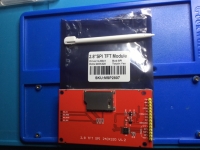
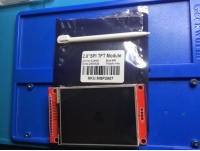
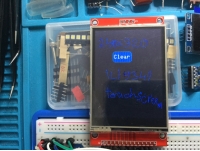
Tips:For questions about your order, place of delivery, product discount, taxation, delivery time, warranty, shipping, payment, exchange rate, and other questions unrelated to the product, please contact customer service.
showing 1-30 of 35|
Show Original
A part of the QA has been auto-translated.
0
Q:
How should I use this display and the available drivers? I've been trying to use it with the Adafruit_ILI9341 library and I only get a white screen.
Hi, Yes it is RoHS compliant according to the manufacturers datasheet
Answered by xcomseller on 14/09/2021Helpful (0)
0
Q:
how can I use the touch with a EP32 - is there somewhere an example do use the TFT and the touch with Arduino IDE. In the download file from Banggood I see only a st Board.
Trythis library: ***** and choose PDQ_ILI9341 Load the sample code and there is also a wiring diagram for the mega.
Answered by BG111045417 on 06/02/2021Helpful (0)
0
Q:
Tested literally everything you can find on google about this screen. ALWAYS WHITESCREEN Adafruit_ILI9341.h graphicstest Serial output is: ILI9341 Test!
Display Power Mode: 0x0
MADCTL Mode: 0x0
Pixel Format: 0x0
Image Format: 0x0
Self Diagnostic: 0x0 The screen is just not being recognized. Is this an error with my libraries or is this fking thing just broken? Spent 4h of my life and reached nothing - close to try solving the problem with a hammer.
Tested literally everything you can find on google about this screen. ALWAYS WHITESCREEN Adafruit_ILI9341.h graphicstest Serial output is: ILI9341 Test!
Display Power Mode: 0x0
MADCTL Mode: 0x0
Pixel Format: 0x0
Image Format: 0x0
Self Diagnostic: 0x0 The screen is just not being recognized. Is this an error with my libraries or is this fking thing just broken? Spent 4h of my life and reached nothing - close to try solving the problem with a hammer.
should ne usable with a raspberry pi, it's an spi connection. Look at adafruit ILI9341 library, for thé touchscreen not sûre of which library you can use, but look after xpt2046 + raspberrypi on google, i'm quite sure that a library exists already :)
Ipersonally don't know, but it seems so. Search YouTube for "nterface TFT display with STM32 in parallel mode || CubeIDE || CubeMX || HAL" (I am not allowed to link directly, sorry)
Answered by mylists on 12/12/2020Helpful (0)
0
Q:
Good afternoon, do you have a notbuk lg400 screen?
Hi, I have this TFT SPI Touch Display ILI9341, program Arduino 1.6.5., and developement board STM32F103C8T6. And I need initialize the display.I have program, but all Power Mode, MADCTL Mode is 0xFF !!! on output.WHERE I HAVE PROBLEM ?????my code is :#include <Adafruit_GFX.h> // this line I have added#include "SPI.h"#include "Adafruit_GFX_AS.h"#include "Adafruit_ILI9341_STM.h"// For the Adafruit shield, these are the default.#define TFT_DC PA0 // (Green) #define TFT_CS PA1 // (Orange) #define TFT_RST PA2 // (Yellow)// STM32 - TFT// 5v - VCC// GND - GND// PA0 - DC// PA1 - CS// PA2 - RST// PA5 - SCK// PA6 - MISO// PA7 - MOSI// 5v - LED AAdafruit_ILI9341_STM tft = Adafruit_ILI9341_STM(TFT_CS, TFT_DC, TFT_RST); // Use hardware SPI void setup() { Serial.begin(115200); Serial.println("ILI9341 Test!"); tft.begin(); // read diagnostics (optional but can help debug problems) uint8_t x = tft.readcommand8(ILI9341_RDMODE); Serial.print("Display Power Mode: 0x"); Serial.println(x, HEX); x = tft.readcommand8(ILI9341_RDMADCTL); Serial.print("MADCTL Mode: 0x"); Serial.println(x, HEX); x = tft.readcommand8(ILI9341_RDPIXFMT); Serial.print("Pixel Format: 0x"); Serial.println(x, HEX); x = tft.readcommand8(ILI9341_RDIMGFMT); Serial.print("Image Format: 0x"); Serial.println(x, HEX); x = tft.readcommand8(ILI9341_RDSELFDIAG); Serial.print("Self Diagnostic: 0x"); Serial.println(x, HEX); Serial.println(F("Benchmark Time (microseconds)")); Serial.print(F("Screen fill ")); Serial.println(testFillScreen()); delay(500); Serial.print(F("Text ")); Serial.println(testText()); delay(3000); Serial.print(F("Lines ")); Serial.println(testLines(ILI9341_CYAN)); delay(500); Serial.print(F("Horiz/Vert Lines ")); Serial.println(testFastLines(ILI9341_RED, ILI9341_BLUE));